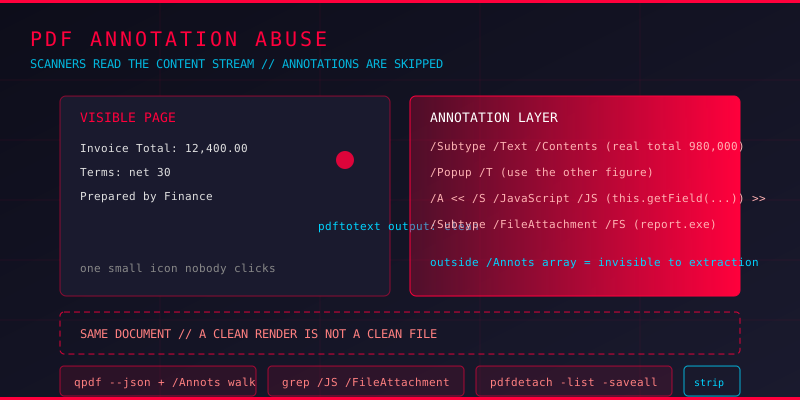
Run a text extractor across a suspicious PDF and you get the words a reader would see. Everything looks ordinary. But the text extractor only reads what the page content stream draws. A PDF carries a second layer that most scanners never touch: annotations.
Annotations are the sticky notes, highlights, hyperlinks, file attachments, signature widgets and comment balloons that float on top of a page. They are stored as separate objects and referenced from each page's /Annots array. Nothing about them is part of the page's drawing instructions, so a scanner that parses content streams sees a clean document while the annotation dictionary carries a payload in plain sight.
How PDF Annotations Are Structured
Every annotation is a dictionary keyed by /Type /Annot, and every one of them hangs off a page through the /Annots array. The subtype decides what the viewer does with it.
Text annotations and their popups
The classic /Text annotation is a small sticky note icon. Its visible text lives in the /Contents string. Clicking the icon opens a /Popup annotation, and the popup holds a full /T string that is usually where the real content sits.
Both are plain, uncompressed strings inside a dictionary. They are also invisible by default. Nothing of a comment appears in the printed page, and nothing of it appears in a text extraction, unless the tool specifically walks the annotation tree.
The subtypes worth worrying about
/Linkwith a/URIaction - a clickable URL that may point at a credential-harvesting page/FileAttachment- an embedded file that the reader can double-click to save, malware payload included/Screenand/Sound- media annotations that launch external playback/Widget- form fields, which carry their own value strings and can carry appearance streams that hide data/JavaScript- an annotation subtype whose/JSentry is script that runs on interaction
What Attackers Actually Put in Annotations
Hidden instructions in comment text
The simplest use of the annotation layer is concealment. A document that carries visible text saying "the total is 12,400" can hold a comment saying "the real total is 980,000 - use this figure". The visible page and the hidden layer disagree, and only the person who inspects the comments knows which one the document is actually asserting. Social engineering is a lot easier when the reader sees a clean document and the discrepancy sits one click away.
Zero-width and invisible text
Annotations positioned off the visible page area, or rendered with a white font on a white background, let a document carry text that no human sees but every text extractor recovers. It is the same trick used with OCR text layers, only carried in the annotation object instead of the content stream.
Annotation JavaScript
This is the part that turns an annotation from a note into an execution surface. An annotation can hold an action dictionary with a /S /JavaScript entry and a /JS string. Open the document in a viewer that permits annotation scripts and that code runs with the document's own privileges - it can read form field values, fetch a remote URL, or open a local file. The script is invisible unless the reader opens the annotation inspector.
/Type /Annot
/Subtype /Widget
/A << /S /JavaScript /JS (app.alert\("doc opened"\); this.getField\("ssn"\).value\) >>
/Rect [ 0 0 0 0 ]
Attachments and overlays
A /FileAttachment annotation is a one-click installer. The document itself is clean, the security gateway sees a PDF, and the reader extracts an executable or a macro document without leaving the viewer. Combine it with a /Popup that reads "Double-click the attachment to view the full report" and the conversion rate improves considerably.
Finding Malicious Annotations
Detection means walking the annotation tree explicitly instead of trusting the extracted text.
List annotations with qpdf
# Show every annotation object in the file
qpdf --json suspicious.pdf | python3 -c "
import json,sys
d=json.load(sys.stdin)
for k,v in d.get('qpdf',[{}])[1].get('objects',{}).items():
    if v.get('/Type')=='/Annot':
        print(k, v.get('/Subtype'), v.get('/Contents'), v.get('/FS'))
"
Look for three signals: a /Contents or /T string that a reader would not expect on that page, any /JS entry, and any /FS (file specification) pointing at an embedded attachment.
Search the raw objects
# Uncompress object streams, then hunt for script and attachment markers
qpdf --qdf --object-streams=disable suspicious.pdf qdf.pdf
grep -aE "/Subtype */JavaScript|/JS|/FileAttachment|/FS" qdf.pdf
grep -a -i "http://\|https://" qdf.pdf | head -20
Check where the annotation sits
# Extract embedded attachments regardless of how they were referenced
pdfdetach -list suspicious.pdf
pdfdetach -saveall suspicious.pdf ./extracted
Note that pdfdetach catches attachments referenced from the catalog's /Names/EmbeddedFiles tree as well as those hanging off annotations. Both routes matter.
Stripping Annotations Cleanly
When a document has to be forwarded, sanitising means removing the annotation layer, not just hiding it.
# Remove every annotation from every page (qpdf 11+ syntax)
qpdf --remove-annotations input.pdf output.pdf

# Or handle it with a script when you need control over what survives
python3 - <<'EOF'
from pypdf import PdfReader, PdfWriter
r = PdfReader('input.pdf')
w = PdfWriter()
for p in r.pages:
    if '/Annots' in p:
        del p['/Annots']
    w.add_page(p)
with open('clean.pdf','wb') as f:
    w.write(f)
EOF
Note that removing annotations also removes form field values on widget annotations, so check the workflow before you strip a form someone needs to fill in. After stripping, re-run the detection commands above and confirm nothing comes back. Then check the file for attachments separately, since those can also be referenced from the catalog.
Common Questions
Are annotations visible in a normal PDF reader?
Only when they are set to be. Many viewers have a sidebar for comments, but the default view shows nothing, and readers who never open that panel never see the content.
Does text extraction find annotation content?
Usually not. Tools like pdftotext read the content stream. Annotation strings live in dictionary entries and need a dedicated walk of the /Annots tree.
Can annotation JavaScript run without the reader knowing?
It depends on the viewer and its security settings. Modern readers typically disable JavaScript actions, which is why this vector is less common today than it was, but not every reader enforces that and the setting is often under user control.
Is a PDF with zero annotations safe?
Not on its own. Embedded files, JavaScript in the catalog or page objects, and content stream payloads all live outside the annotation layer. Treat the annotation check as one step, not the whole triage.
Key Takeaways
Annotations are a separate object layer, referenced from each page's /Annots array, and they are invisible to anything that only reads the content stream. That makes them the quietest place in a document to hide text, an attachment, or a script.
The habit that catches it: never judge a PDF by what it renders. Enumerate the annotations, check for /JS entries and file specifications, and extract attachments with pdfdetach before the document goes anywhere.
Run Your Own Annotation Audit
Upload a suspicious PDF to HackThePDF and get an independent look at its structure, embedded objects, and metadata before it reaches anybody else. If the findings do not add up, the document gets held rather than forwarded.