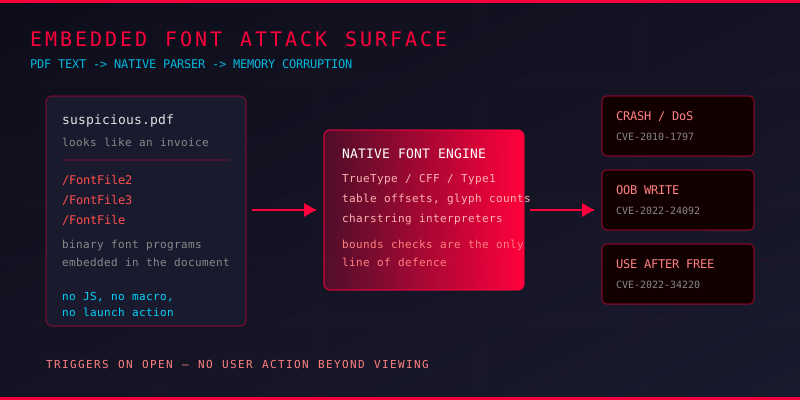
Ask most people why a PDF is dangerous and they will say JavaScript, macros, or an embedded executable. All fair. But there is a part of every PDF that gets far less attention, and it sits in nearly every document you have ever opened: the font.
A PDF does not reference fonts by name and move on. It embeds them. A /FontFile2 stream carries a complete TrueType program, tables, glyph outlines, hinting bytecode and all. /FontFile3 does the same for CFF and OpenType, and /FontFile carries a Type 1 font. Every one of those is a binary blob parsed by native C code inside the reader, often through a shared library like FreeType below the vendor's own PDF engine. That makes the font the most under-audited attack surface in the document.
Why Font Parsing Breaks So Often
Font formats are deceptively complex. A TrueType file is a table directory followed by tables like glyf, loca, cmap, hmtx and maxp, each with its own offset and length, and offsets can point at other offsets. Type 1 fonts have a charstring interpreter with its own stack machine and subroutine calls, and CFF fonts bring a separate virtual machine into the picture.
Every one of those layers is a place where an integer from the file becomes a size, an offset, or an allocation, and the parser has to check it against the real bounds of the buffer. Miss one check and you have memory corruption. The history of PDF security is full of examples:
- CVE-2022-24092 — Adobe Acrobat Reader DC out-of-bounds write in embedded font handling, exploitable for arbitrary code execution.
- CVE-2022-27790 and CVE-2022-34220 — use-after-free flaws in the same reader's font parsing engine, both requiring only that a user open the file.
- CVE-2010-1797 — stack overflows in FreeType's CFF Type 2 charstring interpreter, triggerable through a crafted font embedded in a PDF. This one underpinned the JailbreakMe iOS jailbreak.
- CVE-2010-3814 — heap overflow in FreeType's TrueType interpreter via a crafted
SHZinstruction, demonstrated with a PDF carrying a malicious embedded font.
Notice the pattern. Almost none of these require JavaScript, a launch action, or any PDF-level trick. The file just needs a font, and the reader needs to draw text with it.
The Server-Side Variant
The risk is not limited to desktop readers. Any server-side pipeline that renders, thumbnails, or indexes PDFs inherits the whole font parsing stack. A WordPress site generating PDF previews, a document management system indexing uploads, an email gateway converting attachments to images, a print spooler, all of them call Ghostscript or Poppler, and all of them hand the embedded font to the same native parsers.
This is why font bugs keep landing on servers even though nobody asked for fonts. The attacker needs one unauthenticated upload endpoint that reaches a renderer, and the exploit runs with whatever privileges that service has. Wordfence's discovery of CVE-2026-39919 in Ghostscript, patched in 10.08.0, illustrates that shape well, even though that specific flaw sits in the JPEG 2000 output adapter rather than the font code.
Extracting the Fonts for Analysis
Font programs are self-describing, which makes them far easier to examine than an obfuscated payload. Pull every embedded font out of a suspicious PDF and validate it independently.
Enumerate font objects
Use qpdf to dump the document structure and find font dictionaries:
qpdf --qdf --object-streams=disable suspicious.pdf qdf.pdf
grep -n "FontFile" qdf.pdf
You will see references like /FontFile2, /FontFile3, and /FontFile. Those are the three keys that point at embedded font programs. Everything else in a font dictionary is metadata.
Extract and validate the binaries
For font work, mutool extract or pikepdf both work. This one pulls every embedded font program out with its declared key:
import pikepdf
from pathlib import Path

pdf = pikepdf.open('suspicious.pdf')
out = Path('fonts_out'); out.mkdir(exist_ok=True)

for i, page in enumerate(pdf.pages):
    for name, ref in page.get('/Resources', {}).get('/Font', {}).items():
        obj = ref.get_object()
        desc = obj.get('/FontDescriptor')
        if desc is None and obj.get('/DescendantFonts'):
            desc = obj['/DescendantFonts'][0].get_object().get('/FontDescriptor')
        if desc is None:
            continue
        for key in ('/FontFile', '/FontFile2', '/FontFile3'):
            if key in desc.get_object():
                data = desc.get_object()[key].get_object().read_bytes()
                fn = out / f'p{i}_{name}{key.replace("/", "_")}.bin'
                fn.write_bytes(data)
                print(fn, len(data))
Now validate each binary against its declared type. fonttools is the practical choice:
from fontTools.ttLib import TTFont
import sys

try:
    f = TTFont(sys.argv[1], fontNumber=0)
    print('tables:', sorted(f.keys()))
    print('numGlyphs:', f['maxp'].numGlyphs)
    f.save('/tmp/normalized.ttf')   # fails hard on malformed tables
except Exception as e:
    print('MALFORMED FONT:', type(e).__name__, e)
If fontTools cannot parse it, that is your first signal. A document from a legitimate publisher round-trips through font parsers without complaint. A font that only a specific vulnerable reader chokes on is worth pulling apart further.
Cross-check the declared metadata
The font dictionary carries fields like /FirstChar, /LastChar, /Widths, and /FontBBox. These should line up with the program inside, because a normal exporter writes both from the same source. Check that the character count implied by /LastChar minus /FirstChar plus one matches the width array length, and that the glyph count in maxp matches the loca table.
Building a Detection Pipeline
1. Flag embedded font count outliers. A one-page invoice with nine distinct embedded font programs is unusual. Bulk embedding pads file size and dilutes analysis attention.
2. Validate every font with a strict parser. Run each extracted font through fontTools and ots-sanitize (the OpenType Sanitiser). Reject the file if either refuses it.
3. Check for table inconsistencies. Overlapping tables, offsets that point backwards, a glyf table larger than the file, or a loca array that does not match numGlyphs all indicate hand-crafted fonts.
4. Compare against the document's own baseline. If you process documents from a known producer, hash their embedded fonts. Identical hashes across unrelated documents mean you are looking at a shared library, which is fine. A one-off font is worth a second look.
5. Sandbox the render. Do not render untrusted PDFs in a privileged process. Containerised Ghostscript with a restricted filesystem and no network is the minimum.
A YARA rule for the obvious cases
You will not catch sophisticated exploits with signatures, but you can catch the sloppy ones. Flag any PDF that carries embedded font references:
rule PDF_Embedded_Font_Anomaly {
    meta:
        description = "Suspicious embedded font structure in a PDF"
    strings:
        $fontfile1 = "/FontFile2"
        $fontfile2 = "/FontFile3"
        $fontfile3 = "/FontFile"
    condition:
        uint16(0) == 0x4644 and
        2 of ($fontfile*)
}
The companion rule works on the extracted binary itself, where the parser bugs actually live, checking for a valid TrueType or OpenType signature:
rule Malicious_Font_Program {
    strings:
        $sfnt = { 00 01 00 00 }          // TrueType signature
        $otto = { 4F 54 54 4F }          // 'OTTO' OpenType signature
    condition:
        $sfnt at 0 or $otto at 0
}
What This Means for Your Defences
If you run a document intake pipeline, treat embedded fonts as a separate scanning target with the same seriousness as macros. Most antivirus engines focus on script and executable content, and many skip font streams entirely because they are large, common, and rarely malicious in isolation. That last part is exactly the point: the payload is the font program plus a specific parser bug.
Font parsing bugs are among the highest-impact PDF vulnerabilities because they need no user interaction beyond opening the file. On the reader side, keep Acrobat, Chrome, Edge, and any embedded viewer patched. On the server side, upgrade Ghostscript and Poppler regularly, restrict what the render service can reach, and never run it as root.
Takeaways
The font in a PDF is a program, not decoration. Font parsing has produced some of the most reliable PDF exploits ever shipped, from the FreeType charstring overflows that jailbroke iOS to the Acrobat use-after-free bugs that need nothing more than a double-click. Detection is straightforward: extract every embedded font, parse it with a strict library, and compare the declared metadata against what is actually in the file. Combined with entropy analysis and stream object inspection, it closes a blind spot that most PDF scanning pipelines still have.