PDF Incremental Updates: Revision History Forensics Uncovers Hidden Content
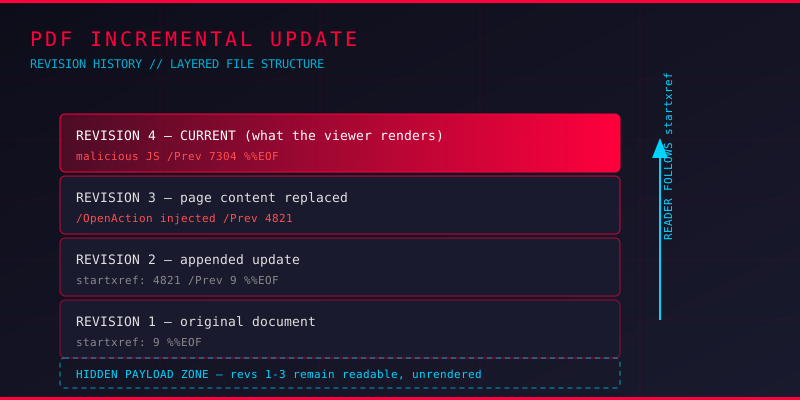
Open a PDF in a viewer, read what it says, then forward it to a colleague or upload it to a portal. What you saw is only the last version of the file. The PDF format lets a document be saved again without rewriting it, and the previous bytes stay in the file forever, fully readable. Every analyst who has handled a disputed contract, a leaked report, or a suspicious invoice has eventually met this behaviour.
This is the incremental update mechanism, and it is the quietest hiding place in PDF security.
What an Incremental Update Actually Does
Normally, saving a PDF rewrites the whole file. An incremental update leaves the original bytes untouched and appends the changes to the end of the file, followed by a fresh cross-reference table and a new trailer pointing back to the previous revision through a /Prev entry.
Because nothing was overwritten, the earlier revision of the document is still in the file, byte for byte, in the order it was originally written. The reader follows startxref to the newest table and never touches the old one.
This behaviour exists for a good reason. Digital signatures in PDF are built around it. If you sign a document and someone else adds a comment, the signature can still validate because it covers the original byte range, not the appended one. But the same design decision hands an attacker a place to stash content that no reader will ever render.
Why Attackers Use It
Swapping out the visible payload
A benign document is distributed. Later, an incremental update replaces the page content stream, adds a JavaScript action, or attaches an embedded executable, while the file size changes only slightly. Tools that only render the final view see a clean file.
Recovering a cleaned document
An author removes a paragraph, a comment, or a name, then saves normally. The editor may write the update incrementally, and the removed text stays recoverable from the earlier revision. In legal discovery this is often the difference between a document that clears someone and one that does not.
Padding a file past a size threshold
Mail gateways and sandboxes sometimes skip large files entirely. Appending junk through repeated updates inflates the file without altering visible content, and a scanner with a size cutoff may never parse the document body.
Detecting a Multi-Revision File
The detection logic is simple, because every incremental update leaves its own structural markers. A file with multiple revisions contains multiple cross-reference sections, multiple %%EOF markers, and multiple trailer dictionaries chained with /Prev.
Here is a quick Python snippet that counts revisions and reports the offset of each cross-reference table without any third-party library:
import re

def audit_revisions(path):
    data = open(path, 'rb').read()
    starts = [m.start() for m in re.finditer(rb'startxref', data)]
    eofs   = [m.start() for m in re.finditer(rb'%%EOF', data)]
    prevs  = re.findall(rb'/Prev\s+(\d+)', data)
    print(f"file size      : {len(data)} bytes")
    print(f"startxref count: {len(starts)}")
    print(f"%%EOF count    : {len(eofs)}")
    print(f"/Prev links    : {len(prevs)}")
    return len(starts)

audit_revisions('suspicious.pdf')
A clean single-revision document reports one of each. More than one startxref means revisions exist, and the counts tell you how many layers to peel.
For deeper inspection, qpdf is the tool to reach for:
qpdf --show-xref document.pdflists every cross-reference table, so each revision boundary is visibleqpdf --check document.pdfreports structural warnings and flags the presence of multiple revisionsqpdf --show-object=trailer document.pdfexposes the trailer dictionary and its/Prevpointermutool show document.pdf trailerworks similarly for readers who prefer MuPDF tooling
Recovering the Previous Revision
Detecting revisions is only half the job. To see what the document looked like before the last save, reconstruct the older state.
The most reliable approach is byte truncation. Because revision N+1 is appended after revision N, cutting the file at the end of revision N leaves a valid document with N as the latest revision:
# find where the last revision begins, then truncate
qpdf --show-xref document.pdf
dd if=document.pdf of=rev1.pdf bs=1 count=143820
For a scripted approach across revisions, pikepdf gives access to the object graph, and reading the file with the trailing revision ignored lets you compare page content across versions:
import pikepdf

pdf = pikepdf.open('document.pdf')
print('pages:', len(pdf.pages))
for i, page in enumerate(pdf.pages):
    print(i, page.obj.get('/Annots'))
    print(i, [k for k in page.obj.keys()])
Compare that against the same dump on the truncated earlier revision. When a page gains an annotation, an action, or a different content stream, you have located the change that matters.
pdftotext rev1.pdf rev1.txt
pdftotext document.pdf rev2.txt
diff rev1.txt rev2.txt
Building a Revision Timeline
For a proper forensic report, the goal is a timeline, not just a diff. Each revision carries its own /ModDate, and each trailer may point to a different /Info dictionary. Collect them in revision order:
- Enumerate every cross-reference offset with
qpdf --show-xrefand sort ascending - For each boundary, truncate a copy of the file and open it in
pikepdf - Pull
/Infometadata:/CreationDate,/ModDate,/Producer,/Creator,/Author - Diff extracted text and enumerate annotations and JavaScript actions per revision
- Record which revision introduced the JavaScript, the external link, or the changed page text
That last step is the deliverable in most cases. A file with four revisions where the fourth adds a /OpenAction pointing to a remote host is, from an evidence standpoint, a different file than the same document with three revisions.
Digital Signatures and Revision Chains
Because this mechanism exists so digital signatures can work, revision chains show up in signature validation too. When a document reports as signed but the byte range covered by the signature ends well before the end of the file, you are looking at an appended revision the signature does not cover.
Tools such as pdfsig and osslsigncode verify will surface this. A signature that validates while the visible content differs from the signed content is not broken. It is a working incremental update, and it is exactly the pattern a document forgery looks like.
Tooling Summary
- qpdf — The reference tool for structural inspection, xref enumeration, and file repair
- mutool (mupdf-tools) — Fast dumping of trailer, objects, and xref data
- pikepdf — Scriptable access to the object graph, ideal for revision-by-revision comparison
- pdftotext (poppler) — Text extraction for diffing content between revisions
- pdfsig — Signature coverage checks against appended byte ranges
Hardening Your Defenses
For teams that receive a lot of PDF attachments, incremental updates belong in the detection rule set rather than being handled ad hoc:
- Flag any PDF with more than one
startxrefor%%EOFmarker, especially on documents with no reason to have a revision history - Watch revision counts on documents that should be freshly generated, such as invoices or one-time download links
- Alert when bytes outside the signed range grow after a signature was applied
- Compare JavaScript actions and annotations between the first and last revision, not just the last
Key Takeaways
PDF incremental updates are not exotic. They are the default behaviour of many editors, they are required for digital signatures to work, and they hide content effectively because no reader renders the history. Detecting them takes a regex over startxref markers; recovering them takes truncation and diffing.
When a PDF does not match its description, or a signed document shows content nobody can explain, count the revisions before you theorise. The answer is usually sitting in the bytes you were never shown.