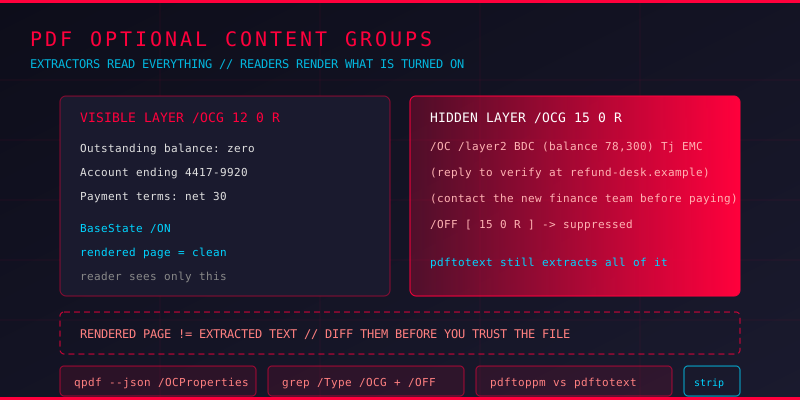
Two PDFs arrive from the same sender on the same morning. One reads like a payment reminder. The other carries an extra paragraph of text that never appears on screen, never prints, and still comes out of every text extractor you throw at it. Same file size class, same page count, same sender. The difference is a layer.
That layer is an optional content group, usually called an OCG. The PDF specification has supported it since version 1.5 for professional publishing workflows: an illustrator can put a watermark on one layer, the editable text on another, and a translation team can toggle the language layer in Acrobat. It is a genuinely useful feature. It is also exactly the kind of feature malware authors like, because visibility is a property of the file, not of the text.
How Optional Content Groups Are Built
Two pieces have to line up. The catalog holds the definition of the layers and their default state, and individual content objects carry a membership marker that binds them to a layer.
The catalog side: OCProperties
The document catalog points at an /OCProperties dictionary. That dictionary carries an /OCGs array listing every layer in the document, and an /D sub-dictionary holding the default configuration - which layers are on, which are off, and what the intended view state is for each one.
/OCProperties <<
/  /OCGs [ 12 0 R 15 0 R ]      % layer definitions
  /D <<
    /OFF [ 15 0 R ]            % this layer starts hidden
    /ON  [ 12 0 R ]
    /Order [ 12 0 R 15 0 R ]
    /BaseState /ON
    /ListMode /AllPages
  >>
>>
Note the difference between /OFF and /BaseState /ON. The base state is the fallback, and layers not mentioned in /OFF follow it. A document can therefore hide a layer by listing it in /OFF while the base state says everything is on, which is easy to miss when reading the dictionary by hand.
The page side: layer membership
Each layer is a dictionary with /Type /OCG, a /Name that shows up in the reader's layer panel, and often a /Usage dictionary describing page ranges and visibility policy. The objects that belong to the layer point back at it with an /OC entry. In a content stream that is a pair of operators wrapped around the drawing commands.
BDC
/OC /layer2 BDC
  (hidden text goes here) Tj
EMC
EMC
Because the membership marker sits inside the content stream, a naive parser that ignores it treats the text as ordinary page content. Whether it draws anything depends on the layer state, not on the text itself.
What Attackers Put in Hidden Layers
Instructions that contradict the visible page
The cleanest use of a hidden layer is disagreement. A visible page reads "Outstanding balance: zero." A suppressed layer in the same content stream reads "Balance owed to the new account 4417-9920: 78,300." Nothing is hidden from a text extractor. Nothing is visible to a human skimming the PDF. If the recipient copies text into an email to their finance team, the hidden number is the one that travels.
Prompt and instruction text aimed at AI readers
This one has grown quickly. A document now gets read by summarisation tools, ticket triage bots and document-understanding pipelines that ingest the extracted text without rendering anything. A hidden layer is a reliable way to get text into that pipeline while keeping it invisible on the page. Layer content can carry instructions aimed at an automated reader, contact details for a fraudulent verification step, or a paragraph that quietly contradicts the visible terms of a contract.
Bait-and-switch variants
Layer state is also a toggle. Many authoring tools leave /OFF on a layer and expect the reader to switch it on. An attacker can ship one document with two mutually exclusive versions - a benign rendering and a hostile one - and flip the state so the same link shows different content to a human and to an automated renderer that respects /OFF.
Layer-dependent actions
Objects inside a hidden layer can still carry actions: /URI links, /Launch entries, embedded file references, JavaScript actions. Whether the reader surfaces them depends on how it handles invisible interactive content, and readers disagree. The link is in the file whether or not anyone sees it.
Finding Hidden Layers
Enumerate the catalog definition
# List every optional content group in the document
qpdf --json suspicious.pdf | python3 -c "
import json,sys
d=json.load(sys.stdin)
q=d.get('qpdf',[{}])[1]
cat=q.get('objects',{}).get(q.get('trailer',{}).get('/Root','1'))
props=q.get('objects',{}).get(cat.get('/OCProperties'),{}).get('/D',{})
off=props.get('/OFF',[])
for k,v in q.get('objects',{}).items():
    if v.get('/Type')=='/OCG':
        print(k, v.get('/Name'), 'HIDDEN' if k in off else 'visible')
"
Anything printing as HIDDEN deserves a look. So does any layer whose name looks like an editing artefact: "Layer 1", "scanner copy", "proof", "do not print".
Grep the decompressed structure
# Unpack object streams and cross-references so the markers are readable
qpdf --qdf --object-streams=disable suspicious.pdf qdf.pdf
grep -a "/OCProperties" -A 30 qdf.pdf
grep -a "/OCG" qdf.pdf
grep -a "/Type */OCG" -B 2 -A 8 qdf.pdf
Find the content that lives inside a layer
# BDC/EMC blocks mark the layer spans in the page content stream
qpdf --qdf --stream-data=uncompress suspicious.pdf qdf2.pdf
python3 - <<'EOF'
import re
data = open('qdf2.pdf','rb').read()
for m in re.finditer(rb'BDC\s*/OC\s*/([^\s]+)\s+BDC(.*?)EMC', data, re.S):
    body = m.group(2)[:200].decode('latin-1').replace('\n',' ')
    print(m.group(1).decode(), '->', body)
EOF
Also worth checking whether the page has a /OCProperties override of its own, since a page can change the layer state independently of the catalog default.
Compare what renders against what extracts
# Rendered page versus extracted text
pdftoppm -png -r 100 suspicious.pdf page
pdftotext suspicious.pdf out.txt
wc -c out.txt
Text present in out.txt but absent from the rendered page image is the signature of hidden content, and layered documents are one of the cleanest ways to produce that gap.
Stripping Layers Cleanly
Fixing the document means resolving the layers rather than merely switching them off, because a viewer can toggle any layer back on.
# Flatten optional content and remove the layer definitions
qpdf --flatten-annotations --flatten-rotation --static-id \
     --remove-page-labels --object-streams=disable \
     input.pdf flat.pdf

# Force every layer on before flattening, then re-check
qpdf --json input.pdf | python3 -c "
import json,sys
print(json.dumps(json.load(sys.stdin)['qpdf'][1]['objects'], indent=1))
" | grep -A 20 OCProperties
For a scripted cleanup, pikepdf gives direct access to the catalog. Resolve /OCProperties, drop the /OC markers from the content streams, and set the layer definitions to visible before saving:
import pikepdf
pdf = pikepdf.open('input.pdf')
root = pdf.Root
props = root.get('/OCProperties')
if props:
    for name in ('/OFF',):
        if name in props.get('/D', {}):
            del props['/D'][name]
    for layer in props.get('/OCGs', []):
        if '/Usage' in layer:
            del layer['/Usage']
pdf.save('clean.pdf')
Always re-run the enumeration after cleanup. A document that still contains an /OCG definition has not been cleaned, no matter what the render looks like.
Common Questions
Are optional content layers used by normal documents?
Yes. Publishing tools, CAD exports, architectural drawings and translated versions of brochures all use them heavily. The feature itself is not a red flag. A hidden layer combined with instructions aimed at the reader is.
Does pdftotext extract hidden layer text?
Usually, yes. Text extraction walks the content stream and does not consult layer visibility by default. That is the gap: extraction sees more than the reader displays.
Does a PDF reader show the hidden layer?
Most readers have a layers panel, and the author has usually disabled the layer, so it takes deliberate action to reveal it. Readers without a layers panel simply never show it.
Are hidden layers a reliable malware indicator?
No. Treat it as a signal worth investigating rather than a verdict. What raises the concern is the content inside the layer: instructions, contradicting figures, action dictionaries, or an attempt to address an automated reader.
Can a layer be hidden again after sanitising?
Only if the layer definition survives. Removing the /OCProperties dictionary and every /OC marker in the content streams eliminates the toggle entirely, and that is the only reliable answer.
Key Takeaways
Optional content groups are a rendering toggle, not a storage boundary. The text inside a hidden layer stays in the file, stays extractable, and can stay invisible on the page. That combination - readable by the machine, invisible to the person - is what makes layers attractive to an attacker and invisible to a scanner.
The habit that catches it: extract the text, render the page, and compare the two. Anything in the first and not the second deserves an explanation before the document moves on.
Run Your Own Layer Audit
Upload a suspicious PDF to HackThePDF and get an independent pass over its layer definitions, hidden content and embedded objects before it reaches anybody else. If the rendered page and the extracted text do not agree, the document gets held rather than forwarded.