PDF Polyglot Files: How Hybrid Payloads Bypass PDF Malware Scanners
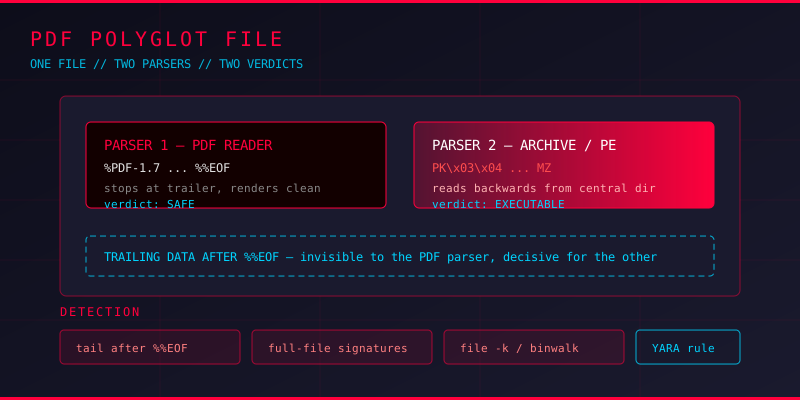
A file that opens cleanly in a PDF reader, prints fine, and gets past every scanner in the mail gateway. It also happens to be a working ZIP archive containing an executable. Nothing about those two facts contradicts each other, which is precisely the problem. Security tooling that decides what a file is by looking at its first few bytes picks one answer and never notices the other.
This is the idea behind a polyglot file, and PDFs are a surprisingly good host for it. The format is famously permissive about what it tolerates after the last %%EOF marker. You can bolt almost anything onto the end and the reader will not care.
What Polyglot Files Look Like in Practice
A polyglot is a single file that is simultaneously valid under two or more parsers. The classic construction is simple. You start with a real document, then append a second payload in a different format:
%PDF-1.7
1 0 obj
<< /Type /Catalog /Pages 2 0 R >>
endobj
...
%%EOF
PK\x03\x04        <-- ZIP local file header, right after the PDF trailer
...              <-- executable or macro-enabled document
The PDF reader walks from the start, parses objects, hits %%EOF, and stops. The archive tool does the opposite: it scans for the end-of-central-directory record at the tail of the file and works backwards, treating everything before it as padding. Both tools are behaving correctly. Both are being fooled.
The variants worth knowing
- PDF + ZIP — the PDF is the carrier, the ZIP holds a script, an ISO, or a second-stage loader.
- PDF + executable — a PE header appended so the file runs after a rename to
.exe, while still rendering as a document if the extension stays.pdf. - PDF + GIF/JPEG — used to defeat content-type rewriting in web upload flows and to hide steganographic payloads.
- PDF + RTF/Word — a document a macro filter treats as an Office file when the magic bytes are parsed differently.
Why Scanners Miss Them
Most mail gateways and file-sharing platforms apply some form of file type detection. The common approach is extension matching, sometimes backed by a magic byte lookup. Both are trivially defeated here, because the attacker controls the extension and the head of the file simultaneously.
The deeper failure is architectural. A scanner that inspects the file once must commit to a single parser and a single verdict. A polyglot needs the pipeline to reach it twice, with two different interpretations, and for the safe verdict to win in one place and the dangerous verdict to win in another. Real delivery chains have plenty of such splits: an upload filter validates as PDF, a downstream antivirus trusts that verdict, and an end user renames the file and hands it to Windows.
Detecting Hybrid Payloads
Detection has to start from the position that a file may be valid under more than one interpretation. That means checking what sits after the PDF ends, and checking what the file looks like if you ignore the PDF structure entirely.
Step 1: Check the trailer and what follows it
The %%EOF marker should sit at the very end of a legitimate PDF. Anything after it is worth inspecting:
import re

data = open('suspicious.pdf', 'rb').read()

eofs = [m.end() for m in re.finditer(rb'%%EOF', data)]
tail = data[eofs[-1]:] if eofs else b''

print('file size     :', len(data))
print('last %%EOF at  :', eofs[-1] if eofs else None)
print('trailing bytes:', len(tail))

if tail.strip():
    print('!! data after trailer:', tail[:16])
    if tail[:2] == b'PK':
        print('   -> ZIP signature detected in trailing data')
    elif tail[:2] == b'MZ':
        print('   -> PE/MZ executable detected in trailing data')
Some legitimate producers pad the file with whitespace, so measure the trailing block rather than assuming any non-empty tail is malicious. A recognised magic signature inside it is a much stronger signal.
Step 2: Look for a second format signature anywhere in the file
A polyglot keeps both grammars intact, so both signatures exist. Scan the whole file rather than just the header:
SIGS = {
    b'%PDF-':   'PDF',
    b'PK\x03\x04': 'ZIP',
    b'MZ':      'Windows PE',
    b'\xd0\xcf\x11\xe0': 'OLE compound (legacy Office)',
    b'GIF8':    'GIF',
    b'\xff\xd8\xff': 'JPEG',
    b'\x7fELF': 'ELF binary',
}

for off in range(0, len(data) - 4):
    chunk = data[off:off+4]
    for sig, name in SIGS.items():
        if chunk.startswith(sig):
            print(f'{name:24} @ offset {off}')
This produces false positives on compressed streams, since compressed data contains arbitrary byte sequences. Treat the output as a list of places to look, not a verdict. What matters is a PK or MZ signature sitting outside any stream object, at an offset that looks structurally meaningful.
Step 3: Let the dedicated tools adjudicate
- qpdf --check reports structural problems and usually flags trailing garbage
- file -k keeps going after the first match, revealing a second interpretation
- binwalk carves embedded files out of the container, showing what a valid PDF parser ignores
- peepdf and pdfid enumerate PDF red flags such as embedded files, launch actions, and OpenAction entries
$ file -k suspicious.pdf
suspicious.pdf: PDF document, version 1.7 (PDF)
suspicious.pdf: Zip archive data, at least v2.0 to extract

$ binwalk suspicious.pdf
    0   0x2020202020202020  Zip archive data, at least v2.0 to extract
  512   0x4b5a9000        Windows PE32 executable
Two type reports from one file is the finding. That output is worth treating as a hard trigger on its own.
Writing Rules That Catch Polyglots
Detection logic works better as a signature than as a reasoning exercise. A minimal YARA rule that flags a PDF carrying a second format header looks like this:
rule PDF_Polyglot_HybridPayload
{
    meta:
        description = "Valid PDF carrying a second executable container signature"
        severity   = "high"

    strings:
        $pdf   = "%PDF-" ascii
        $zip   = { 50 4B 03 04 }
        $pe    = { 4D 5A }
        $ole   = { D0 CF 11 E0 A1 B1 1A E1 }

    condition:
        $pdf at 0 and 2 of ($zip, $pe, $ole)
}
The at 0 anchor matters. It confirms the file genuinely starts as a PDF rather than carrying the string somewhere in a stream, which stops the rule from firing on every document that embeds an archive.
Hardening the Delivery Chain
If you own the pipeline that accepts PDF attachments, the practical controls are less glamorous than detection rules but more effective:
- Reject files where significant data follows the final
%%EOFmarker - Never rely on the extension to decide how a file is parsed, and never let one scanner's verdict suppress another scanner's analysis
- Detect by content type and then strip, rather than passing the original bytes through untouched
- For documents that only need to be read, flatten them to images or sanitise them before releasing them
- Log the type reported by every parser that touched the file, and alert when they disagree
Key Takeaways
A polyglot file is a parser confusion attack, and the confusion is between two parsers that both behave exactly as specified. PDF is an easy host for it because the format tolerates trailing data without complaint, and because a PDF is often the first thing a downstream system trusts without re-checking.
The defensive habit worth building is simple: never ask what a file is, ask what else it might be. Check the bytes after %%EOF. Scan the full file for a second signature. Run file -k and read every line it prints. When two tools describe the same file differently, that disagreement is the finding.