If a PDF arrives with a valid digital signature from a certificate you trust, most people stop looking. That is the whole point of signing. It moves the burden of verification from the reader's intuition to a cryptographic check, and it lets an organisation sign invoices, contracts, and compliance documents without re-reading every one.
Attackers noticed the gap between the signature is cryptographically valid and the signature covers the document you are actually looking at. Those are not the same claim. PDF digital signature wrapping abuses the gap, and the result is a document that shows a green checkmark while carrying an attacker-controlled payload that no reader, scanner, or human ever sees.
How a PDF Signature Actually Works
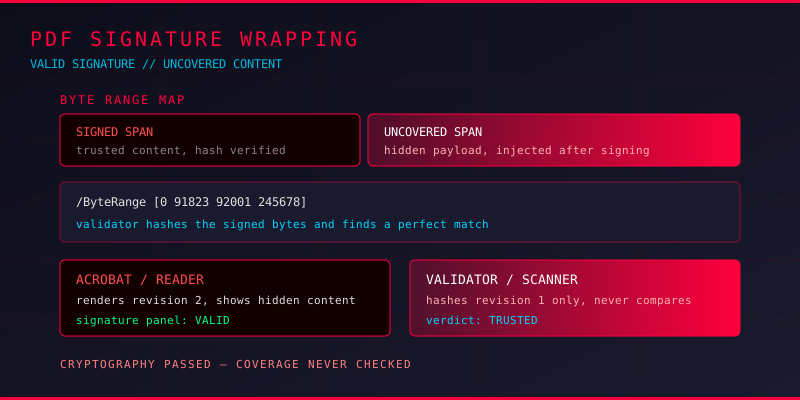
Every signed PDF contains two things: a signature dictionary holding the cryptographic material, and a ByteRange value that tells the verifier exactly which byte offsets were covered when the signature was created. A typical ByteRange looks like this:
/ByteRange [0 91823 92001 245678]
/Contents <3082...hex encoded signature bytes...>
The verifier hashes bytes 0 through 91823 and bytes 92001 through 245678, concatenates the two digests, and checks the result against the signature. Everything outside those two ranges is not covered. In a legitimate document, the only uncovered span is the signature dictionary itself, because it has to hold the signature bytes and cannot hash itself.
So there is a small, well-understood hole in the format by design. The attack is to make that hole much larger than intended.
The Wrapping Attack
PDF documents are built from numbered objects, and objects reference each other by number. The catalog object, for example, is the root that points to the page tree, and the page tree points to individual pages. Nothing in the format prevents several objects from claiming the same number or from existing in places a viewer will not immediately show.
A wrapping attack exploits that. The attacker takes a legitimately signed document and, using an incremental update, appends a new revision containing replacement objects. Because incremental updates preserve the original bytes, the original signature still validates. But the catalog reference can now point at different content, and the malicious content sits outside the signed byte range entirely.
Common wrapping variants
- Signature repurposing — an existing valid signature is copied and reattached to a different content stream, with the hash recalculated over attacker-chosen bytes. The certificate and timestamp stay genuine; the content is not.
- Signature covering nothing — the ByteRange is crafted so the signed region is empty or covers only whitespace. The signature is mathematically valid and covers nothing meaningful.
- Appending an invisible layer — new objects are added after the signed section and referenced by an updated catalog. A viewer renders the new page, the validator checks the old bytes.
- Comment injection into the signed span — the attacker places malicious data inside the signed region but in a location where no parser will ever interpret it as instructions, then uses a second object to point a viewer at it.
The first variant is the one that matters most in practice. If an attacker can obtain a valid signed document and any signed blob, they can graft the signature onto a payload of their choosing. This is why PDF signature wrapping is sometimes compared to the historical weaknesses in Authenticode and OOXML signing, where the same class of flaw let attackers sign malware with a legitimate certificate.
Why Detection Is Hard
The uncomfortable part of signature wrapping is that each individual check still passes.
Open the file in Acrobat, Adobe Reader, or any browser-based PDF viewer and the signature panel shows a valid signer with a green checkmark. Run pdfsig and it reports the signature as good. Hash the signed bytes yourself and they match the certificate perfectly. Every verification step confirms what it was built to confirm, and none of them were built to confirm this.
Detection requires asking a different set of questions: does the signed byte range actually cover the rendered content, is there more than one revision in the file, do multiple objects claim the same object number, and does the catalog the viewer resolves point at objects the signature never covered?
What to check in practice
1. Count the revisions. A file with an incremental update that already carries a signature is unusual for legitimate business documents. Use qpdf --show-xref or parse the startxref chain to find every revision and every %%EOF.
2. Check for duplicate object numbers. Run qpdf --check and read the warnings carefully. Legitimate documents can have revisions, but they should not have two different objects claiming the same number in a way that changes the render.
3. Compare the signed range against the rendered output. Extract the ByteRange, hash those bytes, then separately rasterise or extract text from the document. If the visible content references anything outside the signed range, you have a wrapper.
4. Inspect for invisible content. Look for objects with a rendering mode of 3 (invisible), text outside the media box, and content streams attached to annotation or form fields that a human would never notice.
5. Re-render and diff. Extract text with pdftotext from both the signed revision and the final revision. Any difference means the visible document changed after signing.
Validating Signatures the Right Way
For anyone building document intake or approval pipelines, the takeaway is that a boolean signature_valid == true is not a security control. It is one input among several.
A defensible validation flow looks like this:
- Parse the PDF and enumerate all revisions and all signature fields in the document.
- Reject or quarantine files with more than one signature or with an incremental update that postdates the signature.
- Verify the cryptographic chain: certificate trust, revocation status, and timestamp validity.
- Confirm the signed byte range covers the content the viewer will actually render, not just the first revision.
- Render the document to an image and compare it against a rendering of the signed revision alone.
- Run the file through your standard malware and behaviour analysis pipeline regardless of signature status.
Step six is the one teams argue about. Signatures describe provenance, not safety. A compromised endpoint belonging to a legitimate signer will produce perfectly valid signatures over malicious files, and attackers will happily reuse stolen documents with real signatures.
Forensics Value Beyond the Attack
The same techniques that detect wrapping are useful in any PDF investigation. If you are reconstructing how a document was altered, incremental update analysis tells you what was changed and when, whether or not a signature was involved. The ByteRange, when one exists, acts as a boundary marker: content inside it was vouched for, content outside it was never covered by anyone.
That boundary is genuinely useful in incident response. When a signed contract arrives and something in it looks wrong, you can check whether the suspicious content was ever part of the signed document or arrived with a later append. That single question narrows the investigation faster than a week of document review.
Takeaways
Digital signatures in PDFs are strong evidence when they are verified properly and weak evidence when they are treated as a rubber stamp. Signature wrapping is not a broken cipher; it is a broken assumption about what a valid signature covers. For defenders, the fix is procedural: validate the byte range against the rendered document, reject documents with unexpected revisions, and never let signature status replace malware analysis. If you work with signed PDFs in an enterprise workflow, incremental update forensics and obfuscation pattern detection are worth reading alongside this one.